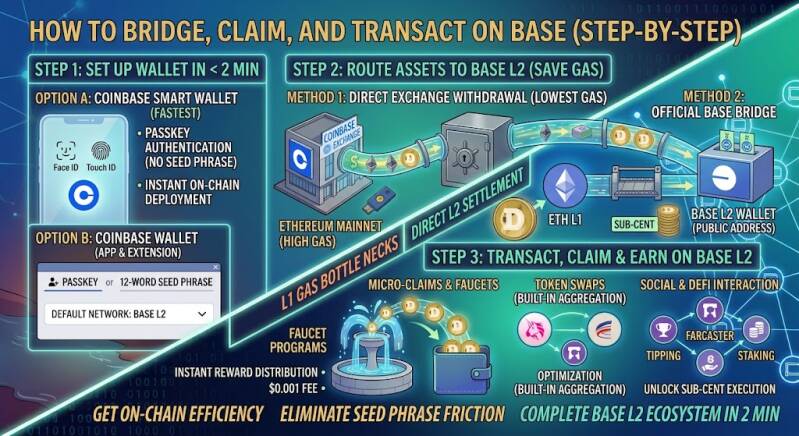
Understanding Layer-2 theory and account abstraction is great, but getting hands-on experience on-chain is where the real value lies. Moving to Base unlocks ultra-low fees, near-instant settlement, and access to a growing ecosystem of decentralized applications—all without complex bridge setups or high execution costs.
This practical step-by-step guide shows you how to set up your wallet, fund your address on Base L2, and execute low-fee transactions in under two minutes.
Step 1: Set Up Coinbase Wallet or Base Smart Wallet
You can access Base using either the full-featured Coinbase Wallet (app/extension) or the streamlined Coinbase Smart Wallet (browser-native).
-
Option A: Coinbase Smart Wallet (Fastest – Passkeys)
-
Navigate to a supported Base DApp or the official Coinbase Smart Wallet portal.
-
Click Create Smart Wallet.
-
Approve your device passkey using Face ID, Touch ID, or Windows Hello. Your secure non-custodial wallet is deployed instantly—no 12-word seed phrase required.
-
-
Option B: Standalone Coinbase Wallet (App & Extension)
-
Download Coinbase Wallet from the official iOS App Store, Android Play Store, or Chrome Web Store.
-
Select Create New Wallet and choose either Passkey or 12-word seed phrase backup.
-
Under settings, confirm your default active network is set to Base.
-
Step 2: Route Assets Straight to Base L2 (Skip Heavy L1 Gas)
Getting funds onto Layer-2 shouldn't cost heavy L1 Ethereum mainnet gas fees. You have two highly optimized routes:
Method 1: Direct Exchange Withdrawal (Lowest Gas Route)
If you hold funds on Coinbase (or another exchange supporting Base L2 withdrawals):
-
Go to your exchange account Withdrawal menu.
-
Select ETH or USDC.
-
Paste your Coinbase Wallet public address (0x...).
-
Crucial Step: When selecting the destination network, choose Base instead of Ethereum L1.
-
Confirm the transfer. Assets will arrive directly in your L2 wallet in seconds for cents in fees.
Method 2: Official Base Bridge
If you already hold funds in an L1 wallet (like Ethereum Mainnet):
-
Connect your wallet to the official Base Bridge (bridge.base.org).
-
Enter the amount of ETH or ERC-20 tokens you wish to bridge.
-
Review execution details and confirm the transaction signature.
Step 3: Interact with High-Speed, Sub-Cent Smart Contracts
Now that your wallet is funded on Base, you can participate in micro-payouts, interact with DEXs, or claim dynamic rewards without paying double-digit gas fees.
-
Claim Faucet Rewards & Dynamic Payouts:
-
Paste your Base public address into reward platforms like dogecoindrip.me to receive micro-claims settled directly to your wallet in seconds.
-
-
Execute Token Swaps via Built-In DEX Aggregation:
-
Open the Swap tab in your Coinbase Wallet.
-
Select Base as your target network.
-
Exchange native ETH or USDC for ecosystem tokens with sub-cent gas fees and zero slippage bottlenecks.
-
-
Explore Social & DeFi Apps:
-
Connect seamlessly to decentralized protocols like Aerodrome, Uniswap, or Farcaster frames using single-click passkey authorizations.
-
The Bottom Line
Onboarding onto Base L2 takes under two minutes. By pairing passkey-enabled Smart Wallets with direct Layer-2 exchange withdrawals, you completely eliminate high L1 gas fees and seed phrase friction.
You get the full security of Ethereum coupled with the execution speed and sub-cent efficiency of Base.
Add comment
Comments